Epson Expression Premium XP-610 Review
Epson Expression Premium XP-610 Wireless Color Photo Printer with Scanner and Copier
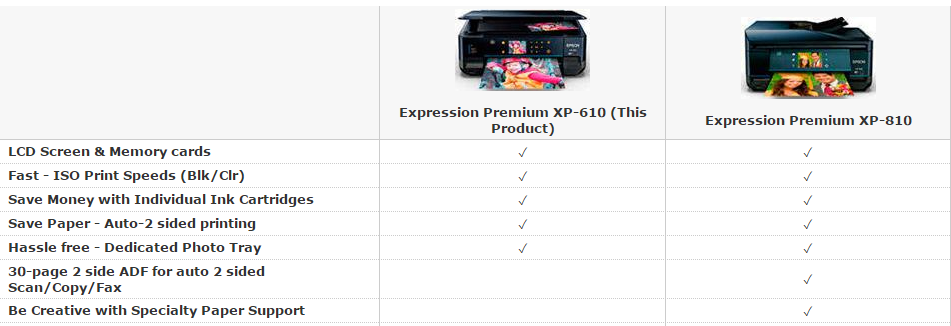
Let’s take a look at the Epson Expression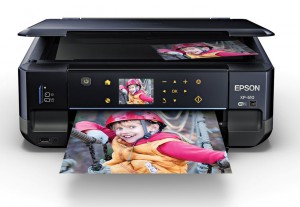 Premium XP-610. This one focuses a bit more on just the basics, combined with good photo printing. There is a scanner on board but it doesn’t have an ADF (automatic document feeder) on it, nor can you send any faxes or do anything office related. Other than the scanner there is also Wi-Fi included in this model to make scanning to and from your printer a piece of cake. If you are looking for a simple photo printer then keep reading this Epson Expression Premium XP-610 review. If not, you can check out my best printer buying guide.
—> Check Epson Premium XP-610 Price and Availability here <—
Simple but Efficient
There is a little screen on the front of the machine and you have just a few sensor buttons to move through some of the settings that you can use to configure the printer. There is also a memory card slot that you can read from and write to. So you can scan to the memory card from the scanner or you could grab this out of your digital camera and load your photos into the printer to print out. Now I should add though that it doesn’t work with Camera Raw, which a lot of people are shooting in. So note that you can only use JPG files. Just so you are aware of that. There is also a USB-slot so you can plug in a memory stick or something similar and grab photos of off that too.
1 paper tray and 1 photo tray
The paper tray is a little confusing to me. I hate to say that about paper trays but I’ll explain why. Basically there are two trays: a bottom tray that isn’t all that deep and a photo tray. You really only get about 50 sheets of paper in the paper tray which is not a lot. So it doesn’t have a lot of capacity. The photo tray however does allow for some extra options. It will print borderless up to 8.5’’ x 11’’. This allows you to do big photos . Another small problem I had is that it’s possible to push the paper tray past its stop point, which I really think is a poor design choice.
Printing and scanning via Wi-Fi
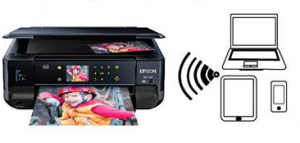
Like I said this printer does have a build-in Wi-Fi. So that way you can do a lot of different things. One of them is actually scanning through Wi-Fi. On my Mac I have a program called Image Capture (it is actually build into all Macs) that will allow you to scan directly to the printer, without any installing, since the program will automatically find the printer. The scan quality is ok, it’s at consumer level of course but this is just fine. If you have a lot of photos to scan it will do a pretty good job. It’s got good resolution and it’s on par with any other scanner in the same range you can find these days.
How to get the most out of the Epson Expression XP-610
Now in order to get the best prints, you better print from a computer. When printing from a Mac you can choose between the Air Print driver and the separate Epson driver. Your Mac will advise you to use Air Print, but it will generate less quality prints. So make sure to select the Epson driver for the best results. Trust me it will be a significant difference in quality.
Conclusion
The quality of the photos is really good, however a real photo lab might be able to deliver higher quality, just keep that in mind. For most people however, this quality is good enough and the fact that you print borderless of your phone without having to plug in or install anything makes this a great machine. So do I recommend this printer? It’s going to depend on what you are looking for. For some people this can be a good choice, others might be better off to use some photo service. Consider for yourself what kind of user you are. I hope you enjoyed reading this and If you would have any questions feel free to contact me.
—> Check Epson Premium XP-610 Price and Availability here <—
Share This:


Best Printers in 2026 — Our Top Recommendations
Looking for a reliable printer in 2026? Here are three of our top-rated picks, all available on Amazon with fast shipping.
1. Epson EcoTank ET-4850 — Best Overall All-in-One
The ET-4850 is our top overall recommendation. The supertank ink system means you’ll rarely need cartridges — just refill the tanks with bottled ink. Excellent print quality, wireless connectivity, auto document feeder, and a compact footprint.
Check the Epson EcoTank ET-4850 price on Amazon
2. Brother HL-L2350DW — Best Budget Laser Printer
For reliable, fast text printing, the Brother HL-L2350DW is hard to beat. Wireless, sharp output, and the toner lasts a long time. A genuinely great laser printer at a very reasonable price.
Check the Brother HL-L2350DW price on Amazon
3. HP OfficeJet Pro 9015e — Best Wireless All-in-One
The HP OfficeJet Pro 9015e offers fast print speeds, HP Instant Ink compatibility, and a strong wireless experience. A great choice for busy home offices.
Check the HP OfficeJet Pro 9015e price on Amazon
Share This:

I think your review about EPSON XP-610 has been very detailed!
Don’t you think that the fact that it does not support ADF is a problem?
Apart from this, i think this product is a good choice for home use.However, as you mentioned, someone must not depend on it for high quality photos!
Serres, the need for an adf depends on what kind of jobs you want to fulfill. The goal of this machine is mostly delivering good quality photos. Targeting home users, or small printing jobs so to speak. So you aren’t looking for tons of prints every time with the Epson XP-610. From my point of view, the lack of an adf is no problem for this particular model.
Hope this answers your question,
Vince