All posts by Vincent

How to Make Money With a Printer

Some of the Best Ways to Make Money With a Printer

Have you been wondering how to make money with a printer?Make-Money-With-a-Printer
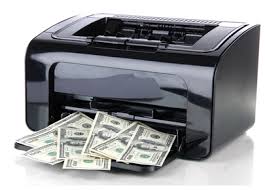
You came to the right place! I will provide you with the most interesting techniques to make money with a printer and none of those will lead to jail!

Lots of possibilities, choose 1

First of all there are many different ways to make money with a printer. There isn’t just 1 correct way. Everybody will have to figure out for himself what he/she likes the most and what niche you want to dig into. A niche market is a smaller part of the market on which a specific product or service is focused. Examples of niches include printing services like textile printing, advertisements, wide format printing, postcards, printer repairing, selling ink,… All of those could become profitable businesses. However, you shouldn’t  try to be a master of everything when you start out. Lots can be said about all of these activities but today I will briefly discuss some of the things I have done myself and end with my personal conclusion about the matter.

  • Textile Printing

All you need is a printing press, a plotter, a website and you are good to go. Many types of textile can be printed on. My advice would be to start with t-shirts and sweaters. Biggest challenge will probably be your marketing campaign and branding. While you could try to sell online, word-of-mouth advertising can work just fine and everybody can do this when handled correctly. I first started selling t-shirtsMake-Money-With-a-Printer-T-shirts to all my friends back In high school. They liked my service and soon enough I was selling to people in the entire school(and other schools).

 

“You can create a business, choose a name, but unless people know about it you’re not going to sell any products.” – Sir Richard Branson

  • Make-Money-With-a-Printer-AdvertisementAdvertisements

Get yourself a wide format printer and start making all kinds of advertisements and large printing jobs. This can be wallpapers, murals, signs on trucks and cars, canvas prints, banners, floor graphics,… Literally anything is possible and both businesses and private customers will make use of your services. From my experience, banners are pure money. On average it costs $1 per square foot to print them and selling them starts at $5 and up in most places. Super easy to do and great profit.

  • 3D printing

Wouldn’t it be amazing to have your own 3D printing company? The excitement one gets about 3D printing(or me at least!) can definitely break down barriers to become an entrepreneur. However, 3D printing isn’t as easy as the previous ideas I gave. As with most things in life, it will come with a lot of ups and downs.

Be realistic, don’t expect you will be makingMake-Money-With-a-Printer-lulzbot millions with a 3D printing hobby. That’s just not going to happen. It can take many years and hard work to become very successful. The 3D printing learning curve is enormous, but anybody who is willing enough to invest time and money in it can make it work and earn a lot of $$$. The moment your business starts rolling it all comes down to scaling. If you want to earn more you will have to learn more. It’s as simple as that.
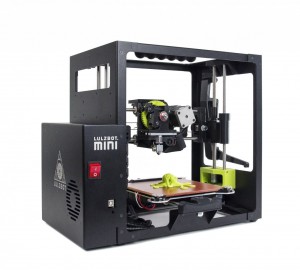
Like I said, lot of knowledge is involved in the 3D printing process. You will need to learn about every aspect of the industry. People need to come to You when they need help. You have to be that go-to-person. With technologies that are ever evolving (and they evolve fast), the learning process will never stop.

Please don’t run away and be all discouraged now. We live in a world that is providing us this knowledge in a lot of ways. Internet has a lot to offer and you would be surprised about how much information you can absorb in just a day. Of course you want the information to be valuable and relevant to you. A good starting point(for pretty much anything) can be You Tube for example. This video-sharing website contains 1.000.000’s of ‘how to’ video’s all rated by people just like you. The rating of a video can be a good clue to see if the information is valuable or not. When I come across a low rated video I almost instantly skip to another one.


For those who already own a 3D printer and want some printing jobs, Shapeways.com is the place to be. People can upload their precious models and let somebody else print it for them. Those who own a printer can start their own online shop and start printing the uploaded designs. Shapeways.com will take care of the business side of the transactions. Although it’s harder to do, you could also create designs yourself and try to sell them.

Conclusion

To conclude, to make money with a printer is possible in a lot of different ways. Depending on your qualities and motivation, one could turn a printing hobby into a real business for sure. With the huge growth in the 3D printer market, there are some nice opportunities to make money with a printer. Don’t hesitate and make your own dreams come true by becoming a full time entrepreneur!

If you would be left with any questions, please drop a comment below.

Vincent

Share This:
FacebooktwitterpinterestFacebooktwitterpinterest
Cleaning Printer Heads for Inkjet Printers: Doing it Right

Cleaning Printer Heads for Inkjet Printers: Doing it Right

The printer head, which is basically3_easy_steps the one that holds the ink cartridges, should be regularly maintained in order to keep them functioning at their best. If not, they can result into inferior quality of printing. You can notice blotches, streaks, and other flaws on the printed output. With such, it is important to find time for cleaning printer heads. For some, this may seem to be a daunting task, but only because they have no idea how it should be done in the right way. Once you know how to do so, you will never think of it as an activity that requires too much effort. After all, it preserves the quality of your printer and ensures high-quality prints, so there is no reason to not pay attention how it should be done.

How to Clean Printer Heads

    1. The first thing that you need to do is to remove the printer head and the ink tanks. If you are conscious that the ink will stick to your hands, you might want to use latex gloves for protection. The ink tanks should be placed in a re-sealable bag as you clean printer heads.
    2. Next, have the printer head soaked. There are different methods by which this can be done. Regardless of what you choose, it will most probably deliver the same cleaning effect. In a shallow pan, place paper towels on the bottom of the container, which will serve as a layer of protection for the circuity. Heat purified water in a microwave and place it in the pan, in a level that is enough to cover the paper towels. You can also use a mixture of water and ammonia. Place the printer heads on the top of the paper towels. By this time, you must see the ink from the printer mixing with water in the pan, effectively removing what has been causing the clogs. You can let it soak for the night, depending on the extent of the clog.After soaking, hold the printer heads under a supply of running water, such as from a faucet or hose. Make sure that there is enough pressure applied on the crevices to remove any gunk that is still there.
    3. The final step to clean printer heads is to have them dried. Once they are completely dried, you can have them installed back in place and enjoy your printer!

printer_ink_on_skinAn alternative method for cleaning printer heads is to use a solution composed of equal parts of Windex and warm water. Submerge the printer heads in the mixture for at least two hours. Once done, use an old toothbrush with soft bristles to clean them.

As always, if you are left with any questions leave a comment below and I will be more than happy to help you out.

Vincent

Best Printers in 2026 — Our Top Recommendations

Looking for a reliable printer in 2026? Here are three of our top-rated picks across different categories, offering excellent value, reliable wireless connectivity, and low running costs.

1. Epson EcoTank ET-4850 — Best Overall All-in-One

The ET-4850 is our top overall recommendation for home and home-office users. The supertank ink system delivers thousands of pages before needing a refill, virtually eliminating cartridge waste and keeping running costs incredibly low. It features solid print speeds, an automatic document feeder, and a surprisingly compact footprint for a full-featured all-in-one.

→ Check the Epson EcoTank ET-4850 price on Amazon

2. Brother HL-L2350DW — Best Budget Laser Printer

If you print mostly text documents and want a reliable workhorse that won’t let you down, the Brother HL-L2350DW is a classic choice. This monochrome laser printer is fast, reliable, and incredibly easy to set up. Its high-capacity replacement toner cartridges keep print-per-page costs minimal, making it perfect for students and professionals alike who need volume printing without the high operating expense.

→ Check the Brother HL-L2350DW price on Amazon

3. HP OfficeJet Pro 9015e — Best Wireless All-in-One

The HP OfficeJet Pro 9015e is a feature-packed all-in-one with strong wireless support, making it ideal for multi-device households. It offers fast printing, automatic two-sided scanning, and seamless integration with the HP Smart app. It’s also Instant Ink eligible, which can help keep running costs predictable. A great choice for busy home offices.

→ Check the HP OfficeJet Pro 9015e price on Amazon

Share This:
FacebooktwitterpinterestFacebooktwitterpinterest

Where to buy cheap ink cartridges?

cmyk-artThe internet is loaded with websites trying to sell you their over expensive ink cartridges. In fact, this is the business strategy of some manufacturers. They are willing to give their printers away for free as long as you buy their ink. Don’t fall into this trap! Lucky enough there are places where you can buy cheap ink cartridges without spending a fortune. Listening to my tips will put you on the right track. After all, I’m willing to advice you as a friend, not a salesman.

 

Buying in bulk

As I have explained before, buying ink in bulk comes with some advantages. Bringing down the price significantly being one of those. However, nobody wants to be stuck with tons of ink. This is where the 3rd party comes in. 3rd party ink sellers are entities that will place huge orders to lower the price. This is beneficial for everybody involved in the buying process. More particular for you, since you will be able to buy high quality ink for a lower price.

Where I get my ink

I order my ink cartridges at TomatoInk. I have been doing so for the past years and I have no intent switching to another vendor. TomatoInk  is a trustworthy company that is by far the cheapest place to get your ink while still preserving the high quality everybody likes. Because they are a company that buys lots of ink at once they are able to sell at a lower price than other sites. By selling exclusively via the internet they don’t have to deal with huge operational costs like the traditional brick-and-mortar stores.

Easy website

Their website is very handy to use too! You can choose between any printer brand and model and TomatoInk will give you a list of compatible cartridges. Just select the one you like and your order is ready. Their website is entirely based around ink selling, which makes it easier to use than most other sites.

Free shipping

Instead of paying extra for shipping costs you are better of ordering a higher amount of cartridges. Just make sure to place an order above $50 so your shipping is free. TomatoInk has a 1 year money back guarantee in case you aren’t 100% satisfied. I can’t tell you too much about this since I have never used it myself.

For the sake of thoroughness, let’s make a quick comparison:

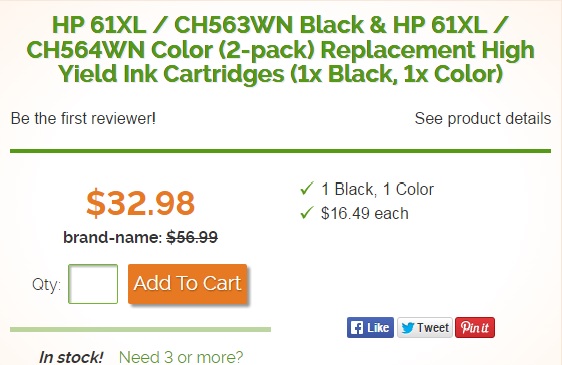
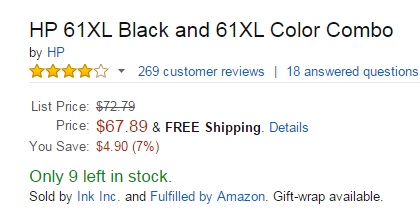
I am looking for an ink cartridge for my HP Envy 4500 model. The first image shows what it would cost me on TomatoInk. The next image is the price at Amazon. Amazon is twice as expensive as TomatoInk, with $68 compared to $33 respectively. Note that these cartridges have the same page yield. It’s a no brainer for me. Get your ink at TomatoInk now!

tomato-ink


Amazon-ink


If you don’t believe me I highly suggest you to go check it out yourself. Let me know about your experience with TomatoInk or other ink vendors. If you have any suggestions/questions leave a comment below.

Good luck with your ink buying!

Vincent

tomati-ink-banner

Share This:
FacebooktwitterpinterestFacebooktwitterpinterest

Best Printers in 2026

Finding a reliable printer that delivers high-quality prints and features modern wireless connectivity can make a huge difference in your workflow. If you are shopping for a new printer this year, these are our three top recommendations for 2026:

  • Top Pick — Best Overall Home Office Inkjet: HP OfficeJet Pro 9125e All-in-One — A versatile, high-speed, and extremely reliable color inkjet printer with modern mobile setup and robust security features, perfect for busy households and home offices.
  • High-Value Photo Printer: Canon PIXMA TR8620a — An exceptional choice for photo enthusiasts, delivering rich colors, multi-function convenience, and seamless smartphone printing.
  • Unmatched Efficiency — Best Budget Monochrome Laser: Brother HL-L2460DW Wireless Laser Printer — A quiet, space-saving monochrome laser printer that prints text pages in a flash, offering an ultra-low cost per print that will save you serious money in the long run.

Share This:
FacebooktwitterpinterestFacebooktwitterpinterest